

For engineering consultancies, Cost Time Resource (CTR)s are central to how projects are planned, estimated, and delivered. Yet despite their importance, because there is no single software tool for managing CTRs alone, engineering project teams typically rely on Excel spreadsheets or try to force-fit an ERP to manage CTRs. Both options create difficulties, making it almost impossible to extract accurate CTR-level data for planning and execution.
In this blog, we’ll explore what CTRs are, why they matter so much in consultancy environments, and how Proteus puts them at the heart of successful project planning and delivery.
What is a CTR?
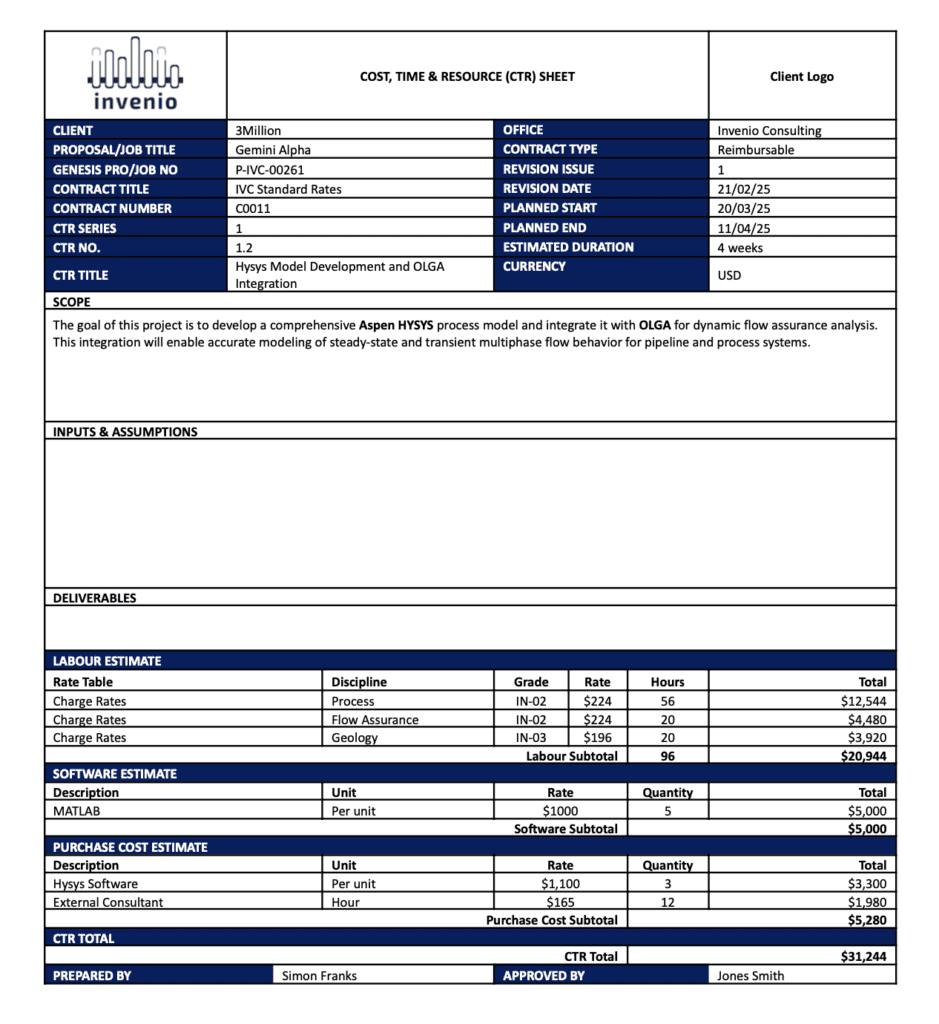
Ok bear with us, there are more layers to this than the average onion. A CTR refers to the Cost, Time, and Resource breakdown for a specific Work Package. These are the fundamental building blocks of a project execution plan. You will also find it referred to as the CTR Sheet, in other words the document/spreadsheet breaking down the details in each work package. Each CTR defines a specific piece of work detailing the scope, schedule, costs, resources and deliverables required to complete it. Together, these form the work breakdown structure (WBS) or CTR catalogue of a project.
Think of it as your project’s blueprint, used to plan, estimate, manage and track your work. A well-structured CTR answers three vital questions:
- What needs to be done? (Scope of a project)
- How long will it take? (Time)
- What will it cost? (Cost and Resources)
Why is using CTRs important for a consultancy?
CTRs do not necessarily feature in every sector’s project management lexicon. They commonly are used in large-scale, high-risk engineering projects e.g. oil and gas, infrastructure, etc. This is because they form a part of formal gate reviews, for example during project phase transitions which are often worked on by multiple consultancies and suppliers. For these engineering consultancies, precision, predictability, and margin control are crucial.
Breaking down projects into granular work packages gives cross-functional project teams a structured understanding of what needs to be done. Most importantly, well-managed CTRs help protect your profit margin. Without a clear view of how cost, time, and resources are allocated, it’s easy to underprice work, misallocate resources, or overlook early warning signs during delivery.
Key benefits of using CTRs include:
-
Aligned expectations: All stakeholders gain a shared understanding of project scope, requirements, and deliverables.
-
Margin protection: Accurate cost and resource estimates reduce the risk of cost overrun and underpricing.
-
Improved visibility: Project teams can track actual performance against the plan in real time, allowing for proactive adjustments.
How are CTRs Typically Managed
While spreadsheets offer familiarity and flexibility, they have obvious weaknesses. Prone to manual errors, they are disconnected from live project data and easily become fragmented as teams duplicate and update information across tabs. Using spreadsheets works in the short term, but they introduce inefficiencies, inconsistencies and risks that only grow with project scale and complexity.
Many consultancies have robust, expensive ERPs in place to manage everything from timesheeting to POs and invoicing. Because these systems are so all encompassing it is very easy to assume the best thing to do is to make some quick and easy configurations and bolt on work package capabilities. There is a temptation to keep everything under one system provider, be that Oracle, SAP, Microsoft or other. Unfortunately, systems that are not well-suited to detailed project control especially in engineering heavy environments end up being unwieldy, unable to manage cost, time and resource tracking effectively.
Why It’s Time to Rethink Your CTR Tools
If you’re still handling your cost time resource planning in Excel, you’re not just wasting time but you’re exposing your consultancy to risk, lost margin and inefficiency.
Most project management software whether its Deltek Vantagepoint or Microsoft project just can’t handle CTRs the way consultancies require. They may support high-level planning but they don’t allow for detailed CTR development and tracking, as a result team members are forced to create workarounds such as maintaining fragmented spreadsheets, duplicating data and disconnected reporting.
Why the CTR is the Heart of Proteus
Whilst other project management software treat CTRs as an afterthought, Proteus puts the CTR at the centre of the project lifecycle. It isn’t just a static spreadsheet, it’s a dynamic system that drives planning, proposals and delivery. Here’s how:
- Create as many CTRs as required in the WBS builder
With the work breakdown structure builder, teams can create parent and child work packages with ease. Each work package/CTR can be populated with detailed information including resource types, timeframes, cost estimates, markups and expenses. This results in a highly structured, granular project plan.
- Automatically insert your CTRs into proposal documents
Once you’ve created your CTRs in Proteus, they can be directly pulled into proposal documents using the Microsoft Word add-in. Proteus dramatically cuts the amount of time spent on proposal writing, there’s no need to copy and paste from Excel or re-enter figures. Proposal templates that reflect your company’s branding, fonts and colours can be used.
- Track CTR progress throughout project delivery
Unlike traditional CTR spreadsheets, Proteus turns your CTR into a live project tracking tool. As work progresses, teams can compare actual data against planned estimates for each work package and monitor project controls. This provides clear visibility into project progress and lets you identify red flags long before they impact project margins.
The Proteus Advantage
By managing your CTRs in Proteus, your consultancy gains:
- Granular control: Create detailed project plans, and when the project is live you can track cost, time and resources for each work package in real-time.
- Consistency: standardise how you estimate and deliver work.
- Speed: build proposals faster by automatically populating proposal documents with CTRs and pre-approved rates.
- Risk reduction: Identify issues before they affect your bottom line.
What does a CTR Template look like?
Here is an example of the key sections in a CTR generated in Proteus. These tables are generated at the Proposal development stage and can be added into a Proposal Document for sharing with a prospective client.
Conclusion
If static spreadsheets or your ERP is making CTR management a nightmare, now is the time to make a change. From planning and estimating to live project tracking, Proteus puts CTRs at the core of your workflow, driving better decisions, protecting your margins, and helping your consultancy deliver successful projects.
Frequently asked questions
What is a CTR in project management?
A CTR is the Cost, Time and Resource breakdown for a specific work package. It sets out the scope, schedule, costs, resources and deliverables for that piece of work, and is also called a CTR sheet.
Why are CTRs important for engineering consultancies?
They give cross-functional teams a structured view of what needs doing, and they protect profit margin. Without a clear view of how cost, time and resources are allocated, it's easy to underprice work, misallocate resources or miss early warning signs.
How are CTRs usually managed, and what are the problems?
Most teams use Excel or a configured ERP. Spreadsheets are prone to manual errors and disconnected from live project data. ERPs that aren't suited to detailed project control struggle to track cost, time and resources.
What is the relationship between a CTR and a work breakdown structure?
Together, the CTRs make up the project's work breakdown structure (WBS), also called the CTR catalogue.
How does Proteus manage CTRs?
You build parent and child work packages in the WBS builder, add them to proposal documents through the Microsoft Word add-in, and track actual against planned for each work package during delivery in the Proteus project delivery module.